Roku Mobile App
Entertainment- Category Entertainment
- Size 21.81 MB
- Requirements Android 4.4 and up
- Downloads 340,000,000+
- Package Name com.roku.remote
- Content Rating 12
About Roku Mobile App Feature
The Roku Mobile App transforms your smartphone into a versatile remote and entertainment companion for your Roku streaming devices and Roku TVs. It extends beyond the capabilities of the traditional physical remote, offering enhanced navigation, private listening, and seamless content discovery. This free application bridges the gap between your mobile device and your television, creating a more integrated and personalized streaming experience. By leveraging the familiarity and functionality of your phone, the Roku Mobile App provides a powerful, convenient, and feature-rich way to control your entertainment center.
Chapter 1: Function
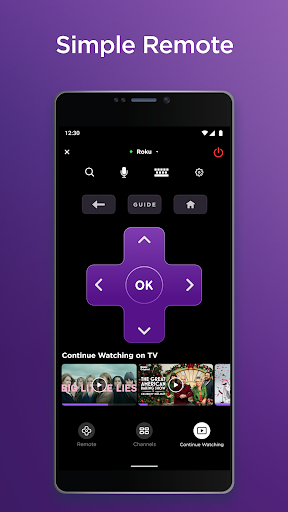
The Roku Mobile App serves as a comprehensive control center for your Roku ecosystem. Its core function is replicating and enhancing the standard remote, featuring a touch-based directional pad, playback controls, and shortcut buttons for home and back navigation. A significant feature is the voice search capability, allowing users to speak the name of a movie, actor, or channel to find it quickly. The app also includes a dedicated keyboard, making text entry for usernames, passwords, and search terms effortless. Furthermore, it enables private listening by routing the TV audio directly to your mobile device's headphone jack or connected Bluetooth headphones. For media consumption, the app supports casting photos and videos from your phone directly to the TV screen. It also provides quick access to settings like adjusting display modes and audio levels.
Chapter 2: Value
The value proposition of the Roku Mobile App lies in its ability to streamline and enrich the user's streaming experience through convenience, personalization, and added functionality. Its primary advantage is convenience; the app ensures you are never without a remote, as your phone is always within reach. The integrated keyboard eliminates the tedious process of typing with an on-screen TV keyboard, saving significant time and effort. The private listening feature is a major benefit, allowing for late-night viewing or immersive audio without disturbing others. This transforms living rooms and bedrooms into personal cinemas. The voice search function accelerates content discovery, making it faster to find new shows or movies across multiple streaming services. By consolidating control and media sharing into a single, familiar device, the app reduces clutter and simplifies the user interface. It effectively turns a smartphone into a powerful hub for managing home entertainment, offering a level of control and accessibility that the physical remote alone cannot match, all at no additional cost to the user.
Chapter 3: Scenarios
The Roku Mobile App is ideally suited for a wide range of users and everyday situations. The primary user group includes all individuals and families who own a Roku streaming player or Roku TV. It is particularly valuable for users who frequently misplace their physical remote, as the app provides an instant backup. The private listening feature is a boon for parents watching movies after children have gone to bed, for students in shared dorm rooms, or for anyone in a household where quiet is essential. The voice search and keyboard functions are immensely helpful for users with large content libraries or those who find manual navigation cumbersome. Furthermore, the app enhances social viewing scenarios; during a party or family gathering, guests can use their own phones to queue up music videos or cast personal photos to the TV without needing to handle the main remote. It is an essential tool for creating a flexible, personalized, and disruption-free streaming environment for every member of the household.