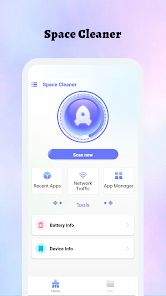
Space Cleaner
Tools- Category Tools
- Size 71.6 MB
- Requirements Android 0 and up
- Downloads 30,000,000+
- Package Name space.cleaner.spacecleaner
- Content Rating Everyone
About Space Cleaner Feature
Space Cleaner is a utility application designed to optimize device storage by systematically identifying and removing unnecessary files. It addresses the common challenge of limited storage space on smartphones and tablets, which can lead to performance degradation. The app provides users with a clear overview of their storage distribution and offers one-tap solutions to reclaim valuable space. By automating the cleanup process, it eliminates the technical burden from users, making device maintenance accessible to everyone. Space Cleaner serves as a digital janitor, ensuring that devices run smoothly and efficiently without requiring manual file management.
Chapter 1: Function
Space Cleaner operates by performing a comprehensive scan of the device's internal storage. It meticulously analyzes the file system to categorize content into types such as cache data, residual files, duplicate photos, unused applications, and obsolete downloads. The core function is its intelligent scanning engine, which differentiates between essential system files and expendable data. Upon completing the scan, the app presents a detailed breakdown of reclaimable space. Users can then selectively or automatically delete identified junk files. Advanced features often include a memory booster to halt background processes, a duplicate file finder for media libraries, and application management tools for bulk uninstallation. The entire process is designed to be completed within a few taps, transforming a complex task into a simple, routine operation.
Chapter 2: Value
The primary value of Space Cleaner lies in its ability to restore and maintain device performance. A cluttered storage is a leading cause of slow response times, application crashes, and system lag. By regularly purging junk files, the app directly contributes to a faster, more responsive user experience. It empowers users to take proactive control of their device's health, preventing storage-related issues before they impact daily use. The advantage of using a dedicated cleaner over manual methods is its depth and accuracy; it can locate cache files and temporary data buried deep within the system that are invisible to the average user. Furthermore, it offers significant convenience, saving users the time and effort required to sift through countless files themselves. For individuals with devices featuring limited built-in storage, Space Cleaner is indispensable, effectively extending the functional lifespan of their hardware. It provides peace of mind, ensuring that the device is operating at its optimal capacity, which is crucial for both productivity and entertainment.
Chapter 3: Scenarios
Space Cleaner is ideally suited for a wide range of users, but it is particularly valuable for individuals with older devices or models with lower storage capacities, such as 32GB or 64GB. Tech-savvy users who install and test numerous apps will find it useful for cleaning residual files. Similarly, photography enthusiasts and social media power users who accumulate large volumes of photos and videos can use the duplicate detection feature to free up significant space. Everyday scenarios include a user receiving a 'storage almost full' alert, prompting them to run the cleaner before taking new photos or installing a critical app update. Another common use case is routine weekly maintenance, where a user proactively clears app cache to ensure smooth performance in frequently used applications like games or browsers. It is also highly beneficial for less technically inclined users who may feel overwhelmed by file system management, as the app provides a simple, safe, and guided cleanup process.